
| 일 | 월 | 화 | 수 | 목 | 금 | 토 |
|---|---|---|---|---|---|---|
| 1 | 2 | 3 | 4 | 5 | 6 | |
| 7 | 8 | 9 | 10 | 11 | 12 | 13 |
| 14 | 15 | 16 | 17 | 18 | 19 | 20 |
| 21 | 22 | 23 | 24 | 25 | 26 | 27 |
| 28 | 29 | 30 |
- Integrated Control
- DM NUX
- LAN Control
- Versiport
- AM-TX3-200
- AV-over-IP
- BYOM
- Crestron CP4
- Conference Room AV
- Crestron NVX
- IR Serial
- Zoom Rooms
- Meeting Room AV
- Wireless HDMI
- AV System Integration
- Meeting Room Automation
- Crestron
- Video Conferencing
- AirMedia
- Video Wall
- Cresnet
- Hybrid Meeting
- Crestron Korea
- AV over IP
- Control Subnet
- Crestron CP4N
- DM-NVX-384
- Relay Wiring
- Teams Rooms
- AV SI
- Today
- Total
RAQIA | Crestron Solutions in S.Korea
Video Conferencing Systems: The Core of Future Collaboration Spaces 본문
Video Conferencing Systems: The Core of Future Collaboration Spaces
RAQIA 라키아 2026. 5. 19. 11:57Hello, this is RAQIA.
Today, we would like to talk about one of the most important topics in modern workplaces: video conferencing systems.
As hybrid work, remote collaboration, and online learning become part of everyday business, video conferencing is no longer just about making a simple video call. Companies now need a complete collaboration environment where people can share ideas, view content, hear each other clearly, and interact naturally regardless of location.
In the past, a meeting room only needed a display, a speakerphone, and basic screen sharing. Today, the expectations are much higher.
A modern video conferencing system may include:
- Interactive displays
- AI-based cameras
- High-quality microphones
- Clear speaker systems
- Wireless presentation
- Microsoft Teams Rooms or Zoom Rooms
- Touch panel control
- Cloud-based device management
- AV and control system integration
From the perspective of workplace trends, the future of collaboration spaces is not about installing more devices. It is about designing a room where technology disappears into the background and people can focus on communication.
The Future of Collaboration Starts with Interactive Displays
The large screen in a meeting room is no longer just a display for viewing presentations.
In modern collaboration spaces, interactive displays are becoming the central hub of the meeting experience. They can support video conferencing, digital whiteboarding, document annotation, wireless screen sharing, and real-time collaboration.
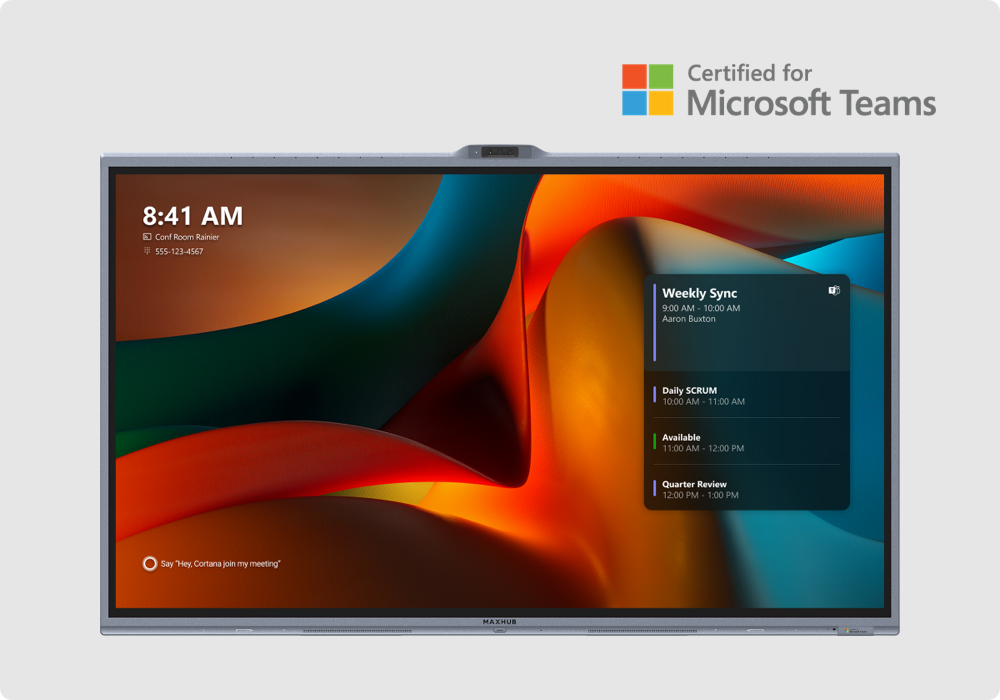
For example, interactive displays such as MAXHUB XBoard for Microsoft Teams Rooms are designed as all-in-one collaboration systems that combine a touch display, camera system, microphones, speakers, and Teams Rooms functionality in one device.
This type of display can help meeting rooms move beyond passive presentation and become active collaboration spaces.
With an interactive display, users can:
- Join a video meeting
- Share documents
- Write or draw ideas on screen
- Annotate content in real time
- Collaborate with remote participants
- Use familiar Windows-based workflows
For hybrid teams, this is especially important. A good interactive display can help remote participants feel more connected to the room and help in-room participants collaborate more naturally.
Why Teams Rooms and Platform Integration Matter
One of the biggest changes in video conferencing system design is the importance of platform integration.
Many companies now use platforms such as:
- Microsoft Teams
- Zoom
- Google Meet
- Webex
- BYOD or BYOM meeting workflows
A video conferencing system should not feel like a separate technical device. It should work naturally with the platform that the company already uses every day.
For example, a Microsoft Teams Rooms environment should allow users to enter the room, start the meeting easily, share content, use the room camera and microphone, and control the meeting without confusion.
This is why hardware, software, and room control should be considered together.
If the display is excellent but the camera is difficult to use, the experience is incomplete. If the camera is good but audio pickup is poor, remote participants may still feel disconnected. If everything works technically but users do not know how to start the meeting, the system has failed from a user experience perspective.
Intelligent Cameras: More Than Just Video Quality
In the past, camera quality was often discussed mainly in terms of resolution.
Today, video conferencing cameras are evaluated by how naturally they represent the room.
Modern meeting cameras may support:

- High-quality video output
- Wide room coverage
- PTZ movement
- Speaker tracking
- Auto framing
- Preset camera positions
- Integration with room control systems
For medium to large meeting rooms, a PTZ camera such as the Crestron 1 Beyond P20 can be useful when one camera needs to cover several areas of the room. The P20 is designed for large spaces and supports high-quality video output with optical zoom capability.
In a real meeting room, this matters because people do not always sit in one fixed position. A presenter may stand near the display. Another participant may speak from the far end of the table. A panel discussion may require the camera to focus on different people during the meeting.
A well-designed camera system should follow the flow of the meeting, not interrupt it.
Clear Audio: The Foundation of Hybrid Meetings
Even if the video looks impressive, a meeting fails if people cannot hear each other clearly.
Audio is one of the most important parts of a video conferencing system.

Common audio problems include:
- Remote participants cannot hear people at the far end of the table
- Background noise makes speech difficult to understand
- Echo interrupts conversation
- Only people near the microphone are heard clearly
- The room layout changes but the microphone coverage does not
This is why microphone and speaker design must be planned carefully.
Wireless modular audio systems such as Crestron Flex Pods can help create more flexible audio coverage in meeting rooms. Crestron Flex Pods are wireless tabletop conferencing devices with built-in speaker and microphones, and multiple Pods can be used together with a hub depending on room requirements.
This type of system can be useful in rooms where participants are seated across a larger table or where the room layout may change over time.
Good meeting room audio should make remote participants feel as if they are part of the same conversation.
From Hardware Specs to User Experience
When companies plan a video conferencing system, it is easy to focus only on hardware specifications.
For example:
- How many pixels does the camera have?
- How large is the display?
- How many microphones are included?
- How powerful are the speakers?
- Does the system support Teams or Zoom?
These specifications are important, but they are not enough.
The real question is:
Can users start the meeting easily and communicate naturally?
A successful video conferencing system should be designed around the actual workflow of the room.
Companies should consider:

- Who uses the room?
- How often is the room used?
- Which meeting platform is used most often?
- Do users need to share content wirelessly?
- Do external guests bring their own laptops?
- Does the room need BYOD or BYOM capability?
- Is one-touch room control required?
- Does IT need remote monitoring?
The best system is not always the system with the highest specifications. It is the system that matches how people actually work.
Software and Cloud Management Are Becoming More Important
As companies build more smart meeting rooms, management becomes a major issue.
One room may be easy to manage manually. However, when a company operates many rooms across several floors, buildings, or branches, manual management becomes inefficient.
This is why cloud-based management platforms are becoming more important in modern video conferencing system design.
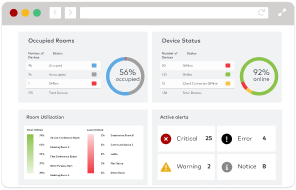
Crestron XiO Cloud is one example of this trend. It allows administrators to deploy, monitor, and manage supported Crestron devices from a centralized dashboard.
With cloud-based room management, IT and AV teams can handle tasks such as:
- Checking device status
- Managing firmware updates
- Monitoring meeting room devices
- Diagnosing issues remotely
- Managing rooms across multiple locations
- Improving operational efficiency
This is especially valuable for companies that operate many meeting rooms or standardized collaboration spaces.
A future-ready video conferencing system should not only work well on the first day. It should also be easy to maintain over time.
AI-Based Meeting Room Trends
AI is becoming increasingly important in video conferencing systems.
AI-based features may include:
- Auto framing
- Speaker tracking
- Noise reduction
- Voice enhancement
- Participant detection
- Camera switching
- Meeting room usage analytics
These features are useful because they reduce manual operation.
For example, instead of asking someone to adjust the camera, an AI-enabled camera system can frame the speaker or adjust the view automatically. Instead of relying only on a single microphone, an intelligent audio system can help reduce background noise and improve speech clarity.
However, AI should not be added only for marketing value. It should support the meeting experience in a practical way.
The goal is not to make the room feel complicated. The goal is to make the room feel natural.
What a Future Collaboration Space Should Include
A future-ready collaboration space should be designed as a complete ecosystem.
Important components may include:
- Interactive display or large-format display
- Camera system suitable for room size
- Microphones and speakers designed for clear communication
- Wireless presentation or screen sharing
- Microsoft Teams Rooms or Zoom Rooms integration
- Touch panel or simple room control interface
- Lighting and blind control where needed
- Cloud-based device management
- AV system integration
- Long-term maintenance planning
The most important point is not whether each device is expensive or advanced. The most important point is whether all of the systems work together smoothly.
A meeting room should be easy to use for employees, visitors, executives, and remote participants.
Common Mistakes When Building a Video Conferencing System
Companies often make several mistakes when planning video conferencing rooms.
1. Choosing Devices Separately
A camera, display, microphone, and speaker may each look good individually. However, if they are not designed as one system, the meeting room experience may still be poor.
2. Ignoring Room Size and Layout
A small huddle room and a large boardroom need different AV designs. The same equipment cannot solve every room.
3. Focusing Only on Video
Clear audio is often more important than video quality. If remote participants cannot hear clearly, the meeting becomes ineffective.
4. Forgetting External Guests
Many meeting rooms are used by visitors, partners, or clients. The system should support easy connection and simple operation.
5. Not Planning for Management
If IT cannot monitor or maintain the system efficiently, the room may become unreliable over time.
RAQIA: Video Conferencing System Integration in Korea
RAQIA is a premium integrated control and AV system brand operated by Bizware System Co., Ltd. in South Korea.
RAQIA specializes in Crestron-based integrated control, meeting room AV systems, video conferencing environments, Microsoft Teams Rooms, Zoom Rooms, AV-over-IP systems, wireless presentation, smart office integration, and premium collaboration spaces.
For companies planning a video conferencing system, RAQIA focuses not only on individual devices, but also on the full meeting room experience.
This includes:
- Display and camera placement
- Microphone and speaker design
- Teams Rooms or Zoom Rooms planning
- Wireless screen sharing
- Touch panel UI
- Lighting and blind control
- AV system integration
- Long-term room operation and management
Official RAQIA service pages:
- Video Conferencing Integration
- AV System Integration
- Crestron Integration and Silver Partner
- VR Demo Room
- Contact RAQIA
Conclusion: Choose the Right Ecosystem, Not Just the Best Device
The future of video conferencing is not about one camera, one display, or one microphone.
It is about creating an integrated collaboration environment where hardware, software, room control, and management work together.
An interactive display can become the visual center of the room. Intelligent cameras can help remote participants see the right people at the right time. High-quality audio systems can make conversation feel natural. Cloud management can help IT teams maintain reliability across many rooms.
When these elements are designed together, the meeting room becomes more than a place to make video calls. It becomes a true collaboration space.
Companies planning a video conferencing system should not ask only, “Which device has the best specification?”
The better question is:
Which system will help our people collaborate naturally today and continue to work reliably in the future?
That is the direction of future collaboration spaces.
FAQ
What is a video conferencing system?
A video conferencing system is a combination of hardware and software that allows people in different locations to communicate through video, audio, content sharing, and collaboration tools.
What should a modern meeting room include?
A modern meeting room may include a display, camera, microphone, speaker system, wireless presentation, Teams Rooms or Zoom Rooms platform, touch control, and remote management capability.
Why is audio important in video conferencing?
Audio is critical because remote participants must hear in-room participants clearly. Poor audio can make a meeting difficult even when the video quality is good.
What is the role of an interactive display?
An interactive display can support video conferencing, digital whiteboarding, annotation, document sharing, and real-time collaboration.
Why should companies consider cloud-based room management?
Cloud-based management helps IT teams monitor devices, apply updates, diagnose issues, and maintain meeting room systems more efficiently across multiple rooms or locations.
For video conferencing system planning in Korea:
- Official Website: https://www.raqia.co.kr/
- Demo Room Reservation: Contact RAQIA
- Email: jhwh@raqia.co.kr
- Phone: 010-9508-6382 / +82-2-558-8347
When video conferencing becomes natural, collaboration becomes stronger.


