| 일 | 월 | 화 | 수 | 목 | 금 | 토 |
|---|---|---|---|---|---|---|
| 1 | 2 | |||||
| 3 | 4 | 5 | 6 | 7 | 8 | 9 |
| 10 | 11 | 12 | 13 | 14 | 15 | 16 |
| 17 | 18 | 19 | 20 | 21 | 22 | 23 |
| 24 | 25 | 26 | 27 | 28 | 29 | 30 |
| 31 |
- Hybrid Meeting
- Relay Wiring
- Crestron
- Cresnet
- Wireless HDMI
- AM-TX3-200
- Integrated Control
- LAN Control
- Zoom Rooms
- IR Serial
- Versiport
- Video Conferencing
- AV SI
- Conference Room AV
- BYOM
- Crestron CP4N
- Crestron Korea
- Teams Rooms
- Crestron CP4
- Video Wall
- AV over IP
- AirMedia
- DM-NVX-384
- Meeting Room Automation
- Control Subnet
- AV-over-IP
- DM NUX
- AV System Integration
- Crestron NVX
- Meeting Room AV
- Today
- Total
RAQIA | Crestron Solutions in S.Korea
Crestron AirMedia Security: Secure Wireless Presentation for Enterprise Meeting Rooms 본문
Crestron AirMedia Security: Secure Wireless Presentation for Enterprise Meeting Rooms
RAQIA 라키아 2026. 5. 19. 13:46Hello, this is RAQIA.
When companies introduce a wireless presentation system into a meeting room, security is one of the most important concerns.
Many IT managers ask questions such as:
- Can wireless screen sharing expose confidential meeting data?
- Can external guests access the internal corporate network?
- How can we prevent unauthorized users from connecting to the meeting room display?
- Can wireless presentation be managed under enterprise security policies?
These are important questions because meeting rooms often handle sensitive business information, executive presentations, financial reports, product plans, customer data, and internal strategy.
Crestron AirMedia is a professional wireless presentation solution designed for enterprise environments. It is not only about removing HDMI cables from the table. It is also about supporting secure collaboration in meeting rooms, boardrooms, training rooms, classrooms, and smart offices.
In this article, we will explain key security features of Crestron AirMedia and how they relate to enterprise AV system integration, meeting room network design, and secure wireless presentation workflows.
Why Wireless Presentation Security Matters
Wireless presentation is convenient, but it must be designed carefully.
In a simple meeting room, users may only think about sharing a laptop screen. However, in an enterprise environment, wireless presentation becomes part of the corporate network and AV infrastructure.
If the system is not designed properly, potential problems may include:
- Unauthorized users connecting to a meeting room display
- Guests accessing internal network resources
- Uncontrolled wireless traffic
- Weak administrator passwords
- Unpatched firmware
- Unclear firewall policies
- Difficulty separating guest and internal users
For this reason, AirMedia security should be considered during the AV system design stage, not after installation.
A secure meeting room is not only a matter of device selection. It requires proper network design, authentication policy, user access control, firmware management, and IT coordination.

AirMedia as a Network-Based Enterprise Device
Crestron AirMedia is designed as a network-connected presentation system.
This means it should be treated as part of the enterprise network environment, not as a simple consumer wireless dongle.
In practical terms, AirMedia security depends on both the device configuration and the supporting network design.
Important design areas include:
- Corporate network policy
- VLAN design
- Guest network separation
- Firewall rules
- Authentication settings
- Device management
- Firmware update policy
- Administrative access control
This is why AirMedia is often used in professional AV integration projects where IT and AV systems must work together.
Encryption for Wireless Presentation
One of the core security concerns in wireless presentation is whether the transmitted content is protected.
Crestron AirMedia Series 3 and AirMedia 2.0 devices support encrypted communication for supported workflows. This helps protect presentation data during transmission between the user device and the AirMedia receiver.
Encryption is important because meeting content may include confidential business data.
Examples include:
- Executive reports
- Financial information
- Product roadmaps
- Customer presentations
- Internal strategy documents
- Legal or HR-related information
For enterprise meeting rooms, encryption should be considered a basic requirement, not an optional feature.
PIN Code Access Control
Another important AirMedia security feature is PIN code access.
With PIN code access, a user must enter the code displayed on the meeting room screen before starting presentation. This helps ensure that only people physically present in the room can connect to the display.
This is useful because wireless presentation systems can sometimes be visible to nearby users on the same network.
PIN code access helps prevent situations such as:
- A user accidentally sharing content to the wrong meeting room
- A nearby user connecting to a display without being in the room
- Unauthorized presentation during a confidential meeting
- Confusion in offices with multiple meeting rooms
For corporate meeting rooms, random PIN code mode is often preferred because the access code changes after sessions, reducing the risk of repeated unauthorized access.
Enterprise Authentication: 802.1X and Active Directory
Enterprise environments often require stronger authentication than a basic password.
Crestron AirMedia can support enterprise-level authentication approaches such as 802.1X network authentication and Active Directory integration, depending on the device model and deployment environment.
802.1X Network Authentication
802.1X helps control which devices are allowed to connect to the network. In an enterprise environment, this can prevent unauthorized devices from gaining access to protected network segments.
Active Directory Integration
Active Directory integration allows organizations to manage user authentication through existing corporate identity systems.
This can be useful for organizations that already use centralized IT account management and want meeting room systems to follow the same security policies.
For secure AV system integration, authentication should be discussed with the IT team early in the project.
Guest and Internal Network Separation
One of the most important questions in meeting room design is how to separate guests from the internal corporate network.
External guests may need to share content in a meeting room, but they should not receive unnecessary access to internal company systems.
AirMedia deployments can support several approaches to network separation depending on the model and system design.
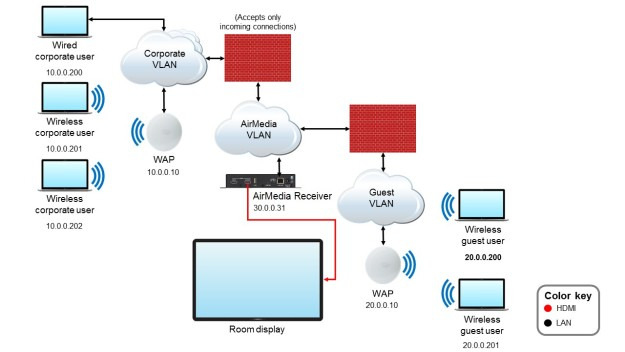
1. VLAN Separation
VLAN separation allows guest traffic and corporate traffic to be logically separated.
For example, AirMedia can be placed in a dedicated VLAN with carefully controlled firewall rules. This can help limit unnecessary access between guest devices and the internal business network.
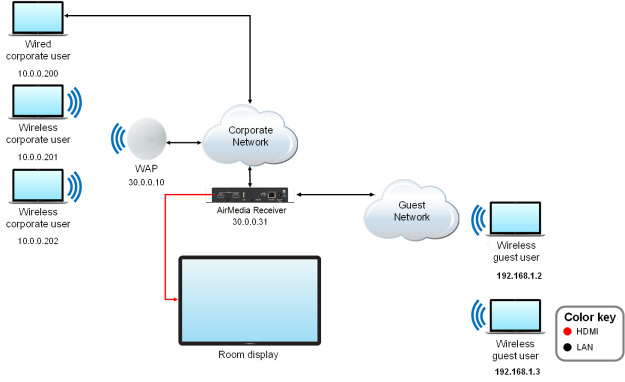
2. Physical Network Separation
For environments with very strict security requirements, physical separation may be considered. This may involve separate devices, separate networks, and controlled switching between inputs.
This approach can be useful in spaces that handle highly sensitive information.

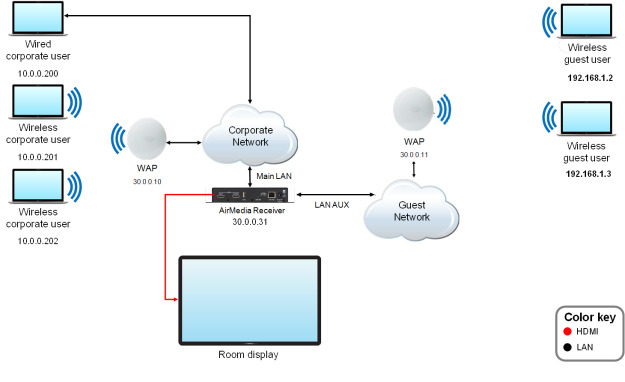
3. Guest Wireless Access Point Mode
Some AirMedia models can support guest wireless access point workflows depending on product configuration. This can help provide a separate wireless path for guests without exposing the internal corporate network directly.

4. Dual LAN Design
Some AirMedia Series 3 models support dual LAN configurations. This can help separate corporate and guest traffic more clearly when the network design requires it.
The right approach depends on the company’s security policy, guest access requirements, and IT network architecture.
Firewall and Port Planning
Secure wireless presentation also requires firewall planning.
AirMedia systems use specific network ports for video, audio, control, device discovery, and management functions. IT teams should review which ports are required and which services should be restricted or disabled.
Typical areas to review include:
- Video stream traffic
- Audio stream traffic
- Control channels
- Web management access
- Device discovery services
- SSH or SFTP access if applicable
- mDNS or Bonjour discovery behavior
For higher-security environments, unnecessary services should be disabled, and only required traffic should be allowed.
This is where coordination between the AV integrator and IT security team becomes essential.
Secure Web Management and Administrator Access
AirMedia devices should also be managed securely.
Basic security practices include:
- Changing default administrator passwords
- Using HTTPS management access where supported
- Limiting administrator access to trusted networks
- Using strong credentials
- Applying role-based access where appropriate
- Keeping device firmware updated
In many organizations, the weakest point is not the wireless presentation function itself. It is poor device administration.
For this reason, administrator access should be treated as part of the overall meeting room security design.
Firmware Updates and Long-Term Security
Security is not a one-time setup.
Firmware updates are important because they may include security improvements, bug fixes, and compatibility updates.
For a single meeting room, manual firmware updates may be manageable. However, for companies operating many meeting rooms, centralized management becomes more important.
Crestron XiO Cloud can be used in supported environments to help with remote monitoring and device management.
Long-term security planning should include:
- Regular firmware review
- Documented update procedures
- Testing before large-scale deployment
- Remote monitoring where appropriate
- Security policy review
- Administrator account management
A secure meeting room system must be maintained throughout its life cycle.
IT Security Checklist for AirMedia Deployment
Before deploying Crestron AirMedia in an enterprise environment, IT and AV teams should review the following checklist.
Initial Setup Checklist
- Change default administrator passwords
- Define PIN code policy
- Decide whether random or fixed PIN mode is appropriate
- Review VLAN or guest network separation
- Review firewall rules
- Check authentication requirements
- Consider 802.1X if required
- Review Active Directory integration if needed
- Enable HTTPS management access where supported
- Disable unnecessary services
- Document device configuration
Operation Checklist
- Review firmware updates regularly
- Monitor device status
- Check administrator accounts
- Review firewall rules periodically
- Educate users about PIN code security
- Define meeting room support procedures
- Document guest sharing workflow
This checklist can help reduce security risk and improve long-term reliability.
Why Secure Wireless Presentation Is Part of AV SI
AirMedia security is not only an IT topic.
It is also an important part of AV system integration.
A professional AV SI project should consider not only whether the display turns on or whether the screen sharing works. It should also consider how the system connects to the network, how guests use the room, how internal users authenticate, and how administrators manage the device.
This is especially important for:
- Corporate meeting rooms
- Executive rooms
- Boardrooms
- Training rooms
- Microsoft Teams Rooms
- Zoom Rooms
- BYOD meeting rooms
- Hybrid collaboration spaces
- Smart office environments
In a secure smart meeting room, AV systems and IT security policies must work together.
AirMedia in Teams Rooms, Zoom Rooms, and BYOD Meeting Rooms
Many companies now use meeting platforms such as Microsoft Teams, Zoom, Google Meet, and Webex.
Wireless presentation systems like AirMedia may be used as part of a broader meeting room design, especially when users need flexible screen sharing or BYOD workflows.
However, the room should be designed carefully so that the user experience and security policy do not conflict.
Important planning questions include:
- Will internal users and guests share the same network?
- Should guests use a separate Wi-Fi network?
- Will the room support Teams Rooms or Zoom Rooms?
- Will users bring their own laptop?
- Should wireless sharing be available to all users?
- Is PIN code access required?
- How will IT manage the devices?
The best meeting room is one where users can share content easily while the company’s security policy remains protected.
RAQIA: Secure Meeting Room AV Integration in Korea
RAQIA is a premium integrated control and AV system brand operated by Bizware System Co., Ltd. in South Korea.
RAQIA specializes in Crestron-based integrated control, AV system integration, secure meeting room design, video conferencing systems, Microsoft Teams Rooms, Zoom Rooms, Crestron AirMedia, AV-over-IP systems, and smart office infrastructure.
For companies considering Crestron AirMedia, wireless presentation systems, Teams Rooms, Zoom Rooms, BYOD meeting rooms, or secure AV network design, RAQIA can help design a complete meeting room environment that considers both user convenience and enterprise security.
Official RAQIA service pages:
- Video Conferencing Integration
- AV System Integration
- Crestron Integration and Silver Partner
- Contact RAQIA
Conclusion: Wireless Presentation Must Be Convenient and Secure
Crestron AirMedia is not just a wireless HDMI replacement.
It is a professional wireless presentation system designed for enterprise meeting rooms where convenience, security, and manageability all matter.
With features such as encrypted communication, PIN code access, enterprise authentication options, guest network separation, secure management, and firmware update workflows, AirMedia can support secure collaboration when properly designed and configured.
However, security does not come from the product alone.
It also depends on proper network design, firewall policy, administrator management, user education, and long-term maintenance.
For companies building AV systems, integrated control systems, Teams Rooms, Zoom Rooms, or smart meeting rooms, wireless presentation security should be treated as part of the overall AV SI strategy.
The best meeting room is not only easy to use. It is also designed to protect the organization’s information.
FAQ
Is Crestron AirMedia secure for enterprise meeting rooms?
Crestron AirMedia supports enterprise-oriented security features such as encrypted communication, PIN code access, network authentication options, and network separation strategies when properly configured.
Why is PIN code access important?
PIN code access helps ensure that only users who can see the meeting room display can start wireless presentation. This reduces the risk of accidental or unauthorized sharing.
Can AirMedia separate guest and corporate networks?
Yes, depending on the model and network design, AirMedia deployments can support strategies such as VLAN separation, guest wireless workflows, physical separation, or dual LAN configurations.
Can AirMedia be used in Teams Rooms or Zoom Rooms environments?
AirMedia can be used as part of a broader meeting room AV design that may include Teams Rooms, Zoom Rooms, BYOD workflows, and wireless presentation requirements.
Who should design AirMedia security settings?
AirMedia security should be planned by both AV integrators and IT teams. Network policy, firewall rules, authentication, VLAN design, and user workflow should be reviewed together.
For secure wireless presentation and meeting room AV integration in Korea:
- Official Website: https://www.raqia.co.kr/
- Video Conferencing Integration: https://www.raqia.co.kr/solution-service/videoconference
- AV System Integration: https://www.raqia.co.kr/solution-service/videoaudio
- Demo Room Reservation: Contact RAQIA
- Email: jhwh@raqia.co.kr
- Phone: 010-9508-6382 / +82-2-558-8347
When wireless collaboration is secure, meeting rooms become easier to trust.


